Make Your Online Shop Speak Clearly with Shop Messages
When you run an online store, every product image is a chance to communicate. Yet many shop owners rely on standard descriptions or hope customers will notice small details buried in the listing. In a crowded marketplace, direct visual cues cut through the noise. That is exactly where Shop Messages come in — a set of hand-drawn graphics designed to sit directly on top of your product photos, banners, or social media posts. They let you say “Reserved for you,” “Out of Stock,” “Gift Card Available,” or “Back Soon” without a single line of code. And because they are built as layered PSD files, fully editable vectors, and even Photoshop brushes, you can tailor them to your brand without needing a design degree.
This article explores why these small overlays matter, how they fit into the way modern shoppers browse, and how you can use them to make your shop feel more professional, personal, and trustworthy.
What Are Shop Messages and Why Do They Matter Now?
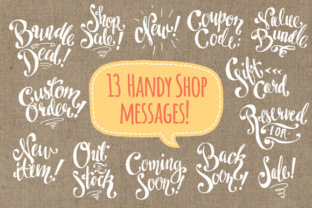
At their core, Shop Messages are pre-made, hand-drawn text overlays that you place over product images or shop banners. The set includes thirteen common messages: “Custom listing,” “Reserved for [name],” “Gift card,” “Out of Stock,” “On Sale,” “Back in Stock,” “Limited Edition,” “Ready to Ship,” “Pre‑order,” “Final Sale,” “Made to Order,” “Coupon Code,” and “On Vacation.” Each message comes in small and large sizes, in both black and white, at 300 dpi — giving you 52 PNG files right out of the box.
But the real value lies in the delivery. You also receive layered PSD files with transparent backgrounds, both in raster and smart object formats. And for those who work in vector software, there is a fully editable, organized AI file. On top of that, a set of Photoshop brushes lets you stamp any message anywhere with a single click. All artwork is drawn by hand, so no fonts are used — meaning the text is not editable, but the aesthetic is consistent and charming.
Why is this relevant today? Online shoppers have shorter attention spans than ever. A 2023 study found that the average visitor spends less than 15 seconds scanning a product page before deciding whether to stay or leave. Text buried in the description often goes unread. Placing a clear, stylized message directly on the product image — like a red “Out of Stock” badge or a friendly “Reserved” tag — instantly answers the most common questions a buyer has. It also builds trust. When customers see a shop using these overlays, they perceive the seller as organised, communicative, and attentive.
A Shift Toward Visual Communication in E‑commerce
For years, online shops relied on text-heavy banners and crowded sidebars. Then came the rise of minimal design, and suddenly less was more. But a new trend is emerging: visual micro‑messaging. Instead of a generic “sold out” label generated by the platform, sellers are creating custom badges, hand-lettered signs, and stylised tags that feel more human. This shift reflects a broader change in consumer expectations. People want to buy from real people, not faceless stores. Hand-drawn elements, even digital ones, evoke a sense of craft and care.
Shop Messages tap directly into that desire for authenticity. Because everything is drawn by hand — no fonts, no stock clipart — each overlay looks like a small piece of art. When you place one on a product photo, it doesn’t feel like a system notification. It feels like a note from the seller. That personal touch is especially valuable for small businesses, artists, and makers who sell on platforms like Etsy, Shopify, Big Cartel, or WooCommerce.
Moreover, the set is designed to be flexible. You can use the PNG files as‑is for quick uploads, or dive into the PSD and vector versions to change colors, resize, rotate, or combine messages. The inclusion of Photoshop brushes is a particularly clever addition — it lets you “stamp” the message wherever you need it, preserving the hand‑drawn look while speeding up your workflow. For shop owners who post dozens of new items each week, that efficiency is a game changer.
Flagging Inventory Status on Product Photos
The most straightforward use is to indicate availability. Place an “Out of Stock” overlay on items that are sold out — it’s clearer than marking the product as unavailable in the backend, because the customer sees the status directly on the image. Similarly, “Back in Stock” or “Limited Edition” overlays create urgency and inform returning customers. You can even use “Pre‑order” to gauge interest before launching a new collection.
Personalizing Customer Communication
For custom or made‑to‑order shops, the “Custom listing” and “Reserved for” overlays are invaluable. When a buyer requests a custom piece, you can create a private listing and add the “Custom listing” overlay to the image so they know it’s a special order. If an item is held for a specific customer (common in vintage or one‑of‑a‑kind shops), the “Reserved for” overlay prevents accidental double purchases and makes the buyer feel valued.
Promoting Sales and Coupons
Banner design is another area where Shop Messages shine. Instead of creating a whole new graphic for a sale, you can take your existing shop banner and place the “On Sale” or “Coupon Code” overlay on top. Because the overlays come in large sizes, they work well as hero images. You can also combine them with your own background — for example, a simple solid colour photo with the “Gift Card” overlay makes a quick but attractive gift card listing.
Vacation and Away Messages
When you need to step away from your shop, the “On Vacation” overlay lets customers know you’ll be back soon. Place it on your shop banner or on a featured product image. This is far more effective than a tiny line of text in your announcement section. It’s also easy to remove when you return — just delete the overlay layer.
Social Media and Promotional Graphics
Because the files are high‑resolution and come in vector format, you can repurpose them for Instagram posts, Facebook covers, or email newsletters. A simple photo of your workspace with a “Back in Stock” stamp can drive traffic back to your shop. The Photoshop brushes make this especially quick — just select a brush, choose a colour, and stamp the message onto any image.
What’s Included in the Shop Messages Set
Understanding the file structure helps you decide how to integrate the set into your workflow. Here is the breakdown:
- Clipart (PNG): 52 files — 13 messages × 2 sizes (small and large) × 2 colours (black and white). 300 dpi, transparent background. Ready to drag onto your image.
- Photoshop Files (PSD): 26 files — each message available as a fully layered PSD with transparent background. You get both a raster version and a smart object version, so you can resize without losing quality.
- Vectors (AI): One Adobe Illustrator file with all 13 messages. Layers are organised and labelled, and every element is fully editable. You can change colours, shapes, and positioning without any loss of fidelity.
- Photoshop Brushes (ABR): A set of brushes that let you stamp each message onto any layer. Perfect for quick work or for adding subtle variations.
All files are hand‑drawn, meaning the text is not editable as typed text — it is artwork. But that also means you never have to worry about missing fonts or rendering issues across different software.
E‑E‑A‑T and Authenticity: Why Hand‑Drawn Overlays Build Trust
Search engines increasingly assess content and sites based on Experience, Expertise, Authoritativeness, and Trustworthiness. For an online shop, trust is built through transparent communication, consistent branding, and attention to detail. Using generic platform‑generated badges might save time, but they can feel impersonal. Custom overlays, especially those that appear handcrafted, signal to both customers and search algorithms that the shop is operated by a real person who cares about presentation.
Furthermore, when you use these overlays on your product images, you reduce the likelihood of customer confusion or disputes. A clearly marked “Final Sale” overlay on a listing sets expectations before the purchase. A “Custom listing” overlay reassures the buyer that they are in the right place. This proactive communication aligns with Google’s emphasis on helpful content — you are helping customers make informed decisions without requiring them to read long paragraphs.
Recommendations for Getting the Most Out of Shop Messages
- Stay consistent with colour. While the set provides black and white PNGs, you can customise the PSD or vector files to match your brand palette. Choose two or three accent colours and use them across all overlays.
- Use the smart object PSDs for dynamic updates. If you often update your shop, create a template where the overlay is a smart object. Then you can swap out the message without rebuilding the entire image.
- Layer overlays with subtle shadows. In Photoshop, add a drop shadow or a thin stroke to the overlay so it pops against busy product photos. The hand‑drawn style already has a charming irregularity, but a little blend mode finesse can make it look integrated.
- Combine with your own banners. Take your existing shop header or promotional image and place an overlay on top. This unifies your branding and saves time on creating separate graphics.
- Experiment with scaling. Don’t be afraid to resize an overlay beyond the “small” and “large” options. The vectors scale infinitely, and the high‑resolution PNGs hold up to significant enlargement.
Looking Ahead: Visual Overlays as a Standard Tool
As online marketplaces grow more competitive, sellers will continue to look for ways to differentiate their storefronts without heavy technical work. Tools like Shop Messages fill that gap — they are simple, effective, and adaptable. We are likely to see more shop owners adopt visual overlays as a standard practice, especially as platforms begin supporting richer image formats and more flexible listing designs. For now, this set offers a complete solution that works across just about any e‑commerce setup, from a small Etsy shop to a custom WordPress store.
The hand‑drawn nature of the graphics ensures they feel warm and approachable, while the technical diversity of the file formats guarantees they integrate smoothly into professional workflows. Whether you are a seasoned shop owner looking to refresh your look or a new seller establishing your brand from scratch, these overlays give you a direct, honest way to talk to your customers through your product images.
Shop Messages are not just stickers — they are a communication upgrade. They let your images do the talking, and in a busy online world, that makes all the difference.